15% OFF
BLACK FRIDAY

Code: BFCM2026

Sale ends 29 November, 2026

The Divi-Modules logo
  • Products
    • All Access
    • Accessibility Bundle
    • Table Maker
    • TablePress Styler
    • Hide & Show PRO
    • Hide & Show
    • Typewriter
    • Text-On-A-Path
    • Image Box
    • AuthorAI
    • Simple Heading
  • Affiliates
    • About
    • Registration
    • Agreement
  • Account
    • Log In
    • Reset Password
  • Support
    • Divi 5.0 Update
    • Testimonials
    • How To Install
    • How To Upgrade
    • Contact
  • Docs
  • Shop
    • Cart
    • Checkout
  • Log In

Documentation

  • Table Maker
    • About
      • Requirements
      • Installation
      • License (Divi-Modules)
      • License (Divi Marketplace)
    • Module Features
      • Module Parts
      • Table Parts
      • Headers & Footers
      • Corner Cells
      • Colspan & Rowspan
      • Lines & Gaps
      • Stripes & Hover
      • Scrolling & Sticky Headers
      • Blocks & Accordion
      • Content Types
      • Text Styling
      • Cell Styling
    • Getting Started
      • Step 01
      • Step 02
      • Step 03
      • Step 04
      • Step 05
      • Step 06
      • Step 07
      • Step 08
      • Step 09
      • Step 10
      • Step 11
      • Step 12
      • Step 13
      • Step 14
    • Content Tab
      • Add New Column
      • Table Title
      • Table Description
      • Table / Column Columns
      • Table Rows
      • Table Corners
      • Table Responsive
      • Table Scrolling
      • Table / Column Icons
      • Table / Column Buttons
      • Table / Column Images
    • Design Tab
      • Table Title
      • Table Description
      • Table Accordion
      • Table Frame
      • Table Stripes
      • Table Hover
      • Table / Column Text & Cells
      • Table / Column Text
      • Table / Column Cells
    • Advanced Tab
      • Custom CSS
    • Table Content
      • Adding Text
      • Adding HTML
      • Adding Links
      • Adding Shortcodes
      • Adding Icons
      • Adding Buttons
      • Adding Images
    • Table Cells
      • Cell Styling
      • Cell Hiding
      • Cell Links
      • Cell Spanning
    • Common Problems
      • Reserved Characters
      • Smart Quotes
      • Vertical Scrolling
    • Plugin Conflicts
    • Known Issues
  1. Docs
  2. Table Maker
  3. Getting Started
  4. Step 01

Step 01

Install and activate your copy of Table Maker in the WordPress > Admin > Plugins area.
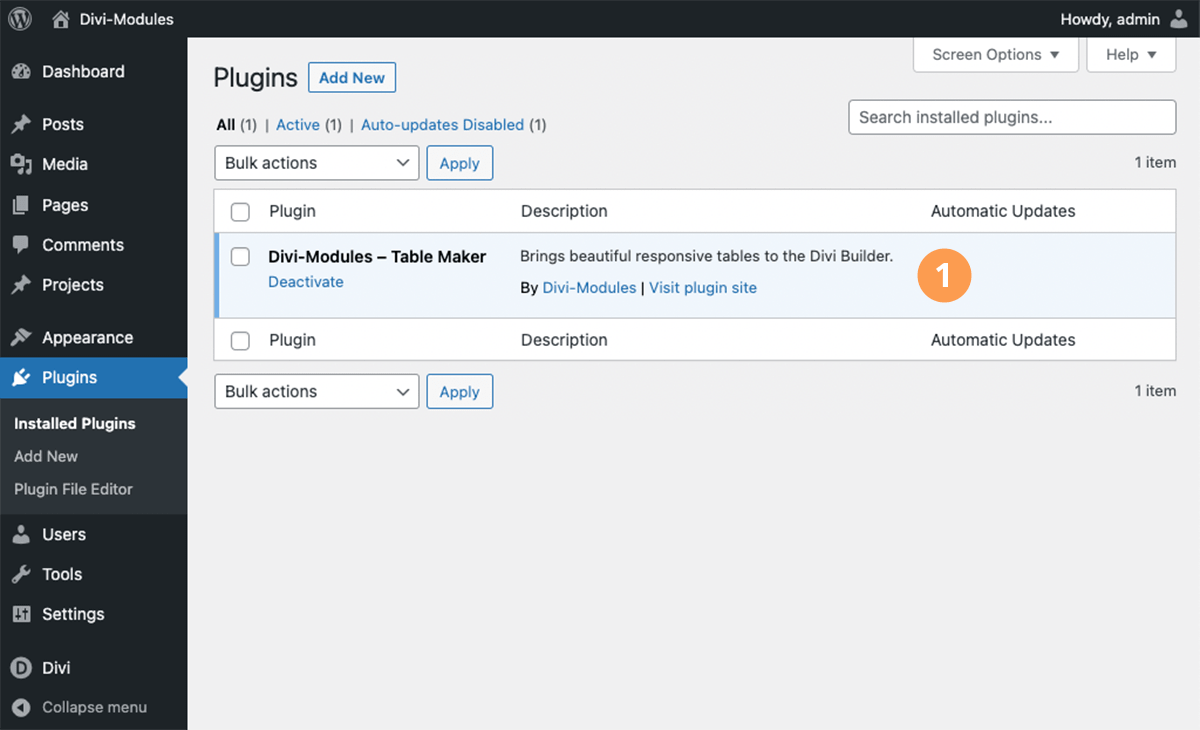
See here for more details.

Documentation image
Prev Next

Still need help?

If you didn’t find what you were looking for, please contact us.

Contact

Divi-Modules Newsletter

Subscribe for news and discounts!

Subscription Form
  • Affiliate Disclosure
  • Product License
  • Terms & Conditions
  • Privacy Policy
  • Accessibility Statement

© 2026 Divi-Modules

Divi is a registered trademark of Elegant Themes, Inc.
This website is not endorsed by Elegant Themes.

Some links on this website are affiliate links. Find out more